Axiom Helm ATLAS is operated by Mahlum Innovations LLC. Text ATLAS lets Axiom Helm account holders text their AI operations assistant to get updates, answer questions, and approve or decline pending actions.
How to opt in
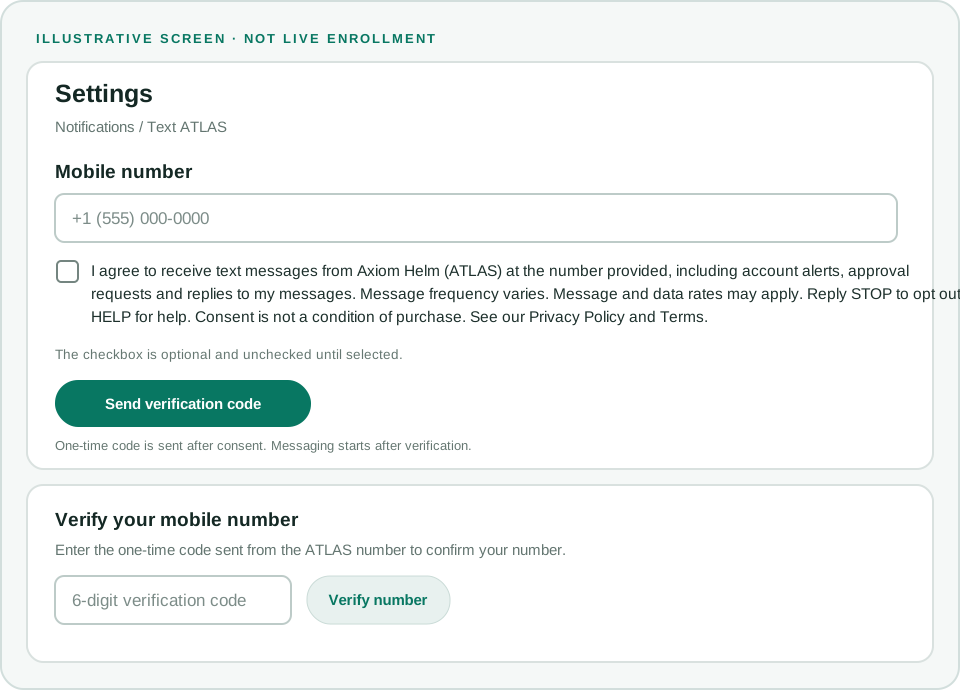
- In your Axiom Helm account, go to Settings > Notifications > Text ATLAS.
- Enter your mobile number and review the disclosure. The optional consent checkbox is unchecked by default.
- Tick the checkbox and confirm the number using the one-time verification code sent from the ATLAS number.
Text ATLAS program messages are sent only after you consent and verify your number. The one-time verification code is sent after consent to confirm your number. Consent is not a condition of purchase.
Text message consent
I agree to receive text messages from Axiom Helm (ATLAS) at the number provided, including account alerts, approval requests and replies to my messages. Message frequency varies. Message and data rates may apply. Reply STOP to opt out or HELP for help. Consent is not a condition of purchase. See our Privacy Policy and Terms.
Illustrative opt-in screen
This illustration shows the opt-in and number-verification steps. It is not a live signup form.
Message frequency and rates
Message frequency varies by account activity. Message and data rates may apply.
Opt out and help
Reply STOP to opt out. Reply HELP for help. For support, email support@axiomhelm.com or call (406) 302-8527.
Read the Privacy Policy and Terms of Service.